
תוכן עניינים
מי לא חווה את הסיטואציה המתסכלת שבה התיישבתם באוטו בבוקר לחוץ, והוא לא הניע? פתאום כל הלחץ עולה ביחד: הפגישה שנקבעה, הילדים שצריך לאסוף… אז אתם מחפשים בגוגל “מצבר עד הבית” כי צריך פתרון בדחיפות, אבל זה בדיוק הרגע שבו אפשר ליפול יותר חזק. לכן, לפני שתזמינו, קראו את 7 הטעויות שאתם חייבים להימנע מהן – הן עולות לאנשים כסף, זמן ולפעמים גם נזק ממשי לרכב.
למה זה קורה? כי ברגע הלחוץ, כל מה שחשוב הוא לפתור את הבעיה מהר וזול. אתם שומעים מחיר טוב – ואומרים כן.
כמה זה עולה לכם? לפעמים הבעיה היא בכלל לא המצבר. האלטרנטור – הרכיב שאחראי על טעינת המצבר בזמן נסיעה – הוא שהתקלקל. תחליפו מצבר בלי לבדוק אותו, ותגלו שהמצבר החדש מת תוך שבוע. שילמתם על מצבר שלא הייתם צריכים.
איך מונעים? פשוט תשאלו: “האם הטכנאי יבצע גם בדיקת מערכת טעינה – כולל האלטרנטור?” כל טכנאי מקצועי שמגיע עם הציוד הנכון יכול לעשות את זה תוך דקות. אם התשובה היא “לא” – שאלו למה.
למה זה קורה? כי אנשים מניחים שמצבר “חדש” הוא מצבר שיצא מהמפעל לאחרונה. אבל זה לא תמיד נכון.
כמה זה עולה לכם? מצבר שישב במחסן שנתיים-שלוש איבד כבר חלק ניכר מיכולתו. אתם מקבלים מוצר “חדש” עם אורך חיים מקוצר מראש. זה אחד הסודות שספקים לא ממהרים להדגיש.
איך מונעים? על כל מצבר מוטבע קוד ייצור – לרוב על תווית צדדית או על גוף המצבר עצמו. בקשו מהטכנאי להראות לכם את התאריך לפני ההתקנה. מצבר טרי לא אמור להיות בן יותר מ-6 חודשים מיום ייצורו.
למה זה קורה? כי רוב האנשים לא יודעים שרכבים עם מערכת Start-Stop – זאת שמכבה את המנוע בעצירות כדי לחסוך בדלק – דורשים מצבר מיוחד. לא כל מצבר מתאים לכל רכב.
כמה זה עולה לכם? התקנת מצבר רגיל ברכב שדורש מצבר מסוג EFB או AGM עלולה לגרום לתקלות במערכת החשמל, לנזק לממשק ה-Start-Stop ולאזהרות על לוח המחוונים. התיקון יעלה הרבה יותר ממה שחסכתם.
איך מונעים? לפני ההזמנה בדקו בספר הרכב או שאלו את הטכנאי: “האם הרכב שלי מצויד ב-Start-Stop ואיזה סוג מצבר מתאים לו?” ספק מקצועי ידע לענות מיידית לפי דגם הרכב.
למה זה קורה? כי המחיר הזול ב-50 שקל נראה משכנע. מזמינים בלי לשאול.
כמה זה עולה לכם? שעתיים של המתנה ליד רכב תקוע. ולפעמים גם ביטול בדקה האחרונה כשמגלים שהחברה לא מגיעה לאזור שלכם. זה לא רק כסף – זה זמן ועצבים.
איך מונעים? תשאלו ישירות: “כמה זמן עד אליי?” ו”האם אתם מכסים את האזור שלי באופן קבוע?” חברה עם פריסה ארצית אמיתית תוכל לומר לכם זמן הגעה ספציפי – לא “נחזור אליך”.
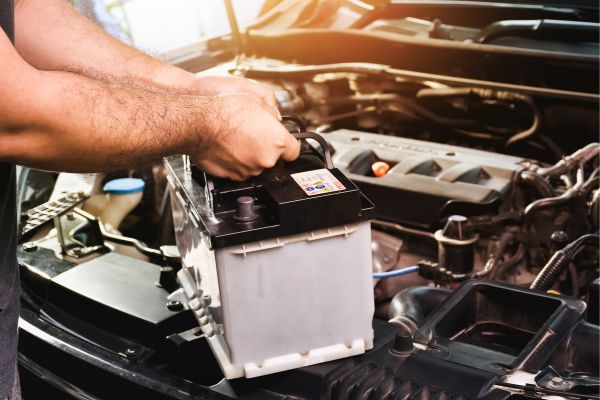
למה זה קורה? כי כולם מניחים שטכנאי הוא טכנאי. אבל יש הבדל גדול בין מי שמגיע עם ברגים לבין מי שמגיע עם ציוד אבחון דיגיטלי.
כמה זה עולה לכם? בלי כלי אבחון מקצועיים, הטכנאי לא יכול לדעת בוודאות אם הבעיה היא באמת המצבר, ולא יוכל לבדוק שהמצבר החדש עובד כשורה אחרי ההתקנה. אתם מקבלים שירות חלקי.
איך מונעים? בשיחה הראשונה שאלו: “האם הטכנאי מגיע עם מכשיר בדיקת מצבר ובדיקת מערכת טעינה?” התשובה הנכונה היא כן – ובלי היסוסים.
למה זה קורה? כשהרכב לא מניע, האחריות היא הדבר האחרון שחושבים עליו. אבל היא הדבר הראשון שצריך לברר.
כמה זה עולה לכם? מצבר בלי אחריות ברורה הוא הימור. ומה עם המצבר הישן? על פי החוק בישראל, עסק שמוכר מצבר חייב לקבל בחזרה את המצבר המשומש לצורך מחזור. אם הטכנאי לא לוקח אותו – אתם עלולים להישאר עם פסולת חומרים מסוכנים ועם אחריות שאינכם יכולים לממש.
איך מונעים? שאלו שאלות פשוטות: “כמה זמן האחריות?” ו”מה היא מכסה?” וגם: “האם אתם לוקחים את המצבר הישן?” אלה שאלות לגיטימיות לחלוטין שכל ספק רציני ישמח לענות עליהן.
למה זה קורה? כי בלחץ הרגע מסתפקים ב”נגיע בהקדם האפשרי”. זה נשמע מרגיע – אבל זה לא אומר כלום.
כמה זה עולה לכם? אתם יושבים ליד הרכב, לא יודעים אם לחכות או להתחיל לארגן הסעה חלופית. חצי שעה הופכת לשעה וחצי. אין לכם מספר של הטכנאי, ה”שירות” לא עונה.
איך מונעים? בסיום השיחה בקשו שני דברים: זמן הגעה מחייב – ולו בטווח של 30 דקות – ומספר טלפון ישיר של הטכנאי שמגיע. ספק מקצועי לא יתקשה לתת את שניהם.
שבע הטעויות האלה לא דורשות ידע טכני עמוק. הן דורשות רק שאלות נכונות ברגע הנכון. הרגע שבין השיחה לטכנאי לבין הרגע שהמצבר נמצא בידיים שלכם – זה הרגע שקובע.
לפני הזמנת מצבר לרכב, זכרו ארבעה דברים מרכזיים:
בתיקתק מצברים אנחנו מגיעים עד אליכם בפריסה ארצית, עם ציוד אבחון מקצועי, שירות החלפת מצברים עד הבית הכולל בדיקת מערכת טעינה, ואחריות מלאה על כל מצבר שמותקן. אם אתם לא בטוחים איזה מצבר לרכב מתאים לכם – התקשרו אלינו לפני שאתם מזמינים. נשמח לעזור לכם להזמין נכון.
We firmly believe that the internet should be available and accessible to anyone, and are committed to providing a website that is accessible to the widest possible audience, regardless of circumstance and ability.
To fulfill this, we aim to adhere as strictly as possible to the World Wide Web Consortium’s (W3C) Web Content Accessibility Guidelines 2.1 (WCAG 2.1) at the AA level. These guidelines explain how to make web content accessible to people with a wide array of disabilities. Complying with those guidelines helps us ensure that the website is accessible to all people: blind people, people with motor impairments, visual impairment, cognitive disabilities, and more.
This website utilizes various technologies that are meant to make it as accessible as possible at all times. We utilize an accessibility interface that allows persons with specific disabilities to adjust the website’s UI (user interface) and design it to their personal needs.
Additionally, the website utilizes an AI-based application that runs in the background and optimizes its accessibility level constantly. This application remediates the website’s HTML, adapts Its functionality and behavior for screen-readers used by the blind users, and for keyboard functions used by individuals with motor impairments.
If you’ve found a malfunction or have ideas for improvement, we’ll be happy to hear from you. You can reach out to the website’s operators by using the following email
Our website implements the ARIA attributes (Accessible Rich Internet Applications) technique, alongside various different behavioral changes, to ensure blind users visiting with screen-readers are able to read, comprehend, and enjoy the website’s functions. As soon as a user with a screen-reader enters your site, they immediately receive a prompt to enter the Screen-Reader Profile so they can browse and operate your site effectively. Here’s how our website covers some of the most important screen-reader requirements, alongside console screenshots of code examples:
Screen-reader optimization: we run a background process that learns the website’s components from top to bottom, to ensure ongoing compliance even when updating the website. In this process, we provide screen-readers with meaningful data using the ARIA set of attributes. For example, we provide accurate form labels; descriptions for actionable icons (social media icons, search icons, cart icons, etc.); validation guidance for form inputs; element roles such as buttons, menus, modal dialogues (popups), and others. Additionally, the background process scans all of the website’s images and provides an accurate and meaningful image-object-recognition-based description as an ALT (alternate text) tag for images that are not described. It will also extract texts that are embedded within the image, using an OCR (optical character recognition) technology. To turn on screen-reader adjustments at any time, users need only to press the Alt+1 keyboard combination. Screen-reader users also get automatic announcements to turn the Screen-reader mode on as soon as they enter the website.
These adjustments are compatible with all popular screen readers, including JAWS and NVDA.
Keyboard navigation optimization: The background process also adjusts the website’s HTML, and adds various behaviors using JavaScript code to make the website operable by the keyboard. This includes the ability to navigate the website using the Tab and Shift+Tab keys, operate dropdowns with the arrow keys, close them with Esc, trigger buttons and links using the Enter key, navigate between radio and checkbox elements using the arrow keys, and fill them in with the Spacebar or Enter key.Additionally, keyboard users will find quick-navigation and content-skip menus, available at any time by clicking Alt+1, or as the first elements of the site while navigating with the keyboard. The background process also handles triggered popups by moving the keyboard focus towards them as soon as they appear, and not allow the focus drift outside of it.
Users can also use shortcuts such as “M” (menus), “H” (headings), “F” (forms), “B” (buttons), and “G” (graphics) to jump to specific elements.
We aim to support the widest array of browsers and assistive technologies as possible, so our users can choose the best fitting tools for them, with as few limitations as possible. Therefore, we have worked very hard to be able to support all major systems that comprise over 95% of the user market share including Google Chrome, Mozilla Firefox, Apple Safari, Opera and Microsoft Edge, JAWS and NVDA (screen readers), both for Windows and for MAC users.
Despite our very best efforts to allow anybody to adjust the website to their needs, there may still be pages or sections that are not fully accessible, are in the process of becoming accessible, or are lacking an adequate technological solution to make them accessible. Still, we are continually improving our accessibility, adding, updating and improving its options and features, and developing and adopting new technologies. All this is meant to reach the optimal level of accessibility, following technological advancements. For any assistance, please reach out to